How I Nearly Brought Down My Database Building a Card Game
How I Nearly Brought Down My Database Building a Card Game
*A deeper look at the load spike that hit FlipMatch's Supabase instance — and what I learned about polling, multiplayer architecture, and the hidden cost of "just fetch everything."*
I built FlipMatch — a multiplayer card-matching game — and it was working. Players could create rooms, join games, flip cards, and match pairs. But when I started testing it seriously, something went wrong. Supabase CPU climbed. Disk I/O warnings appeared. The game felt less seamless. The database was clearly under stress.
So I dug in to find out what was actually happening. The answer wasn't a single bug. It was a stack of small, repeated decisions that compounded badly under real multiplayer load. Here's the full breakdown.
*Memory utilization — max memory per day on a 0.5 GB instance. The March 23 bump aligns exactly with the CPU spike.*
The biggest culprit
A Polling Loop That Never Rested
The heart of the problem was in multiplayer-room.tsx. Every open room page was polling the backend on a 150-millisecond interval to keep the game state fresh. That sounds reasonable in isolation — it's less than a sixth of a second — but the math adds up quickly.
Every device running the game has its own polling loop. Every loop triggers the same backend room assembly. Every backend response re-reads live state from multiple tables. So even a straightforward two-player game was generating a genuinely substantial amount of repeated database work — and a three or four-player session would multiply that further.
Not one read — many
Every Poll Was a Mini Room Reconstruction
It would have been one thing if each poll just fetched a single status value. But that's not how the room read worked. Inside flip-match-multiplayer.ts, every room fetch pulled from three separate tables:
So one poll was effectively a complete room reconstruction. The backend had to determine which cards were visible for the current viewer, compute the active player state, compute matched IDs, and shape the final game object. That serialization work consumed CPU on every cycle — even when nothing had actually changed in the game.
Read pressure meets write pressure
Game Actions Made Things Worse
The polling was the largest source of read pressure. But gameplay itself added write pressure on top. Every create, join, start, and flip action wrote to flipmatch.rooms, flipmatch.room_players, and flipmatch.room_cards.
On their own, those writes were manageable. The real issue was that they were mixed with extremely frequent read polling, so the system was constantly reading fresh state immediately after every change. The result was a database that was always busy — reading, writing, serializing, repeating.
"The system was behaving like 'ask the database for everything again and again' — rather than 'push only the changes when something actually happens.'"
That difference — pull vs push — is the heart of the performance problem. And it's easy to overlook when you're iterating quickly on feature work.
The disk I/O warning explained
Repeated Reads Hit the Storage Budget Hard
The Disk I/O warning I saw in Supabase aligned exactly with this pattern. Repeated polling caused repeated reads from the same hot tables — repeated scans, repeated index lookups, repeated retrieval of card and player state. On a small or free-tier Supabase instance, this can exhaust the available Disk I/O budget faster than expected, especially during active testing windows.
And this wasn't some mysterious infrastructure issue. It was my own usage pattern, faithfully reflected back at me in the metrics.
Was it the security work?
RLS Wasn't to Blame
Around the same time, I had been running RLS changes — enabling row-level security and adding read policies across the game tables. My first instinct was to wonder whether the security work had introduced the performance issue.
It hadn't. Enabling RLS and adding simple read policies improves security and carries minimal performance cost in a setup like this. That work wasn't what drove the spike. And neither was historical data — old completed game records weren't the issue either. The system wasn't slowing because of too many past rows. It was slowing because the live room path was too chatty.
The March 23 spike
The Graphs Were Just Showing Me My Own Behavior
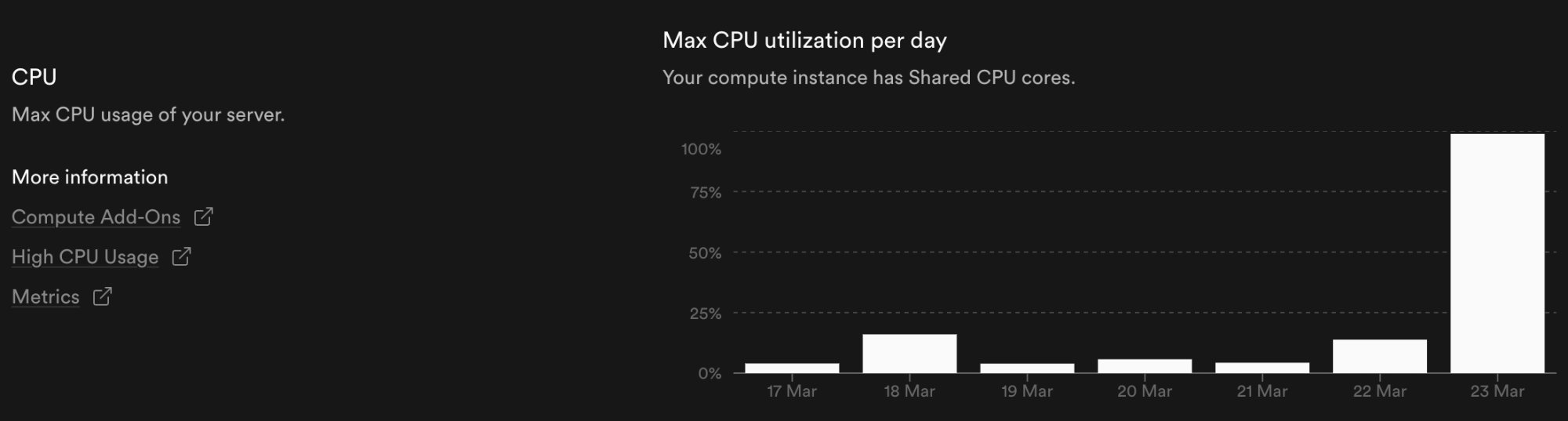
There was a dramatic CPU spike on March 23 that initially looked alarming. But once I traced it back, the explanation was straightforward: that was the day I was actively testing FlipMatch multiplayer. Multiple devices and laptops. Room creation, joins, repeated room fetching, active gameplay and card flips. The spike wasn't random — it matched my testing window exactly.
Memory told the same story. While memory held relatively steady most days — sitting around 35–40% of the 0.5 GB instance — it crept up noticeably on March 23 as the repeated room reconstructions and serialization work compounded in RAM alongside the CPU pressure.
In a way, that was reassuring. The system was behaving predictably. It was just that the architecture I'd built was predictably expensive.
The root cause
Four Layers Working Against Me
Pulling it all together, the load was being created by four compounding factors:
Together, these four factors explain why Supabase CPU climbed, why Disk I/O spiked, why room interactions felt increasingly laggy, and why the game got less seamless the more actively it was used.
What comes next
The Fixes, in Order of Impact
Now that the root cause is clear, the path forward is also clear. These are the fixes I'm prioritizing, ordered by the impact each one is likely to have:
1. Reduce or remove 150ms polling. This is the highest-leverage change. The room shouldn't be refreshing on a timer — it should update when something actually changes.
2. Move multiplayer room syncing to Supabase Realtime. Push-based updates over a persistent connection mean the server only sends data when the game state changes.
3. Keep local optimistic UI for instant card flips. Fast-feeling interactions don't require a server round-trip on every tap — the UI can update immediately and reconcile later.
4. Fetch smaller room payloads when possible. Not every client needs to receive every piece of room state on every update.
5. Keep active-room queries narrowly focused and indexed. Make sure the queries that do run are efficient and not doing full-table work.
None of these are especially difficult changes in isolation. The architecture shift from polling to realtime is the most significant, but Supabase Realtime is built for exactly this use case. The game will be faster, more scalable, and far lighter on the database.
The lesson here isn't a cautionary tale about being sloppy. Polling is a perfectly reasonable starting point for a game prototype. The mistake was letting it run unchecked into active multiplayer testing without thinking through the compounding effects. The moment you add a second player, you've doubled the load. The moment you add a second device, you've doubled it again.
Building real-time collaborative features requires thinking in terms of events and deltas — not snapshots. I know that now, and FlipMatch will be better for it.
Thanks for reading! If you found this helpful, feel free to connect with me.
Get in Touch